What is the phone actually looking at when the number goes up?
Do one squat and the number on the screen goes up by one.
No camera is pointed at you. You didn’t press a button. Yet the app decides, “that was one rep.”
How? The answer lives not in exercise knowledge but on the other side — the phone’s sensor and the detection algorithm. This article walks through how LegScroll actually counts squats, step by step, written by the person who built it.
What it measures is acceleration
LegScroll isn’t watching video or counting steps. It watches acceleration.
The iPhone has an accelerometer that senses how the device moves, dozens of times per second. LegScroll reads it 50 times a second.
But it doesn’t use the raw acceleration as-is. The iPhone reports the acceleration from your movement separately from the ever-present pull of gravity. Being able to treat those two apart is the foundation for everything that follows.
Up and down, whatever the angle
This is the most important part — and the most misunderstood.
Some people hold the phone; others drop it in a pocket. The angle varies. And yet the app can pull out only the vertical motion of sinking and standing up. How?
What it does is project the motion acceleration onto the direction of gravity.
Gravity always points straight down. So if you take the part of the motion acceleration that lies along gravity, that part is the vertical movement. No matter what angle the phone is at, “straight down” doesn’t change — which is exactly why the reading is orientation-independent.
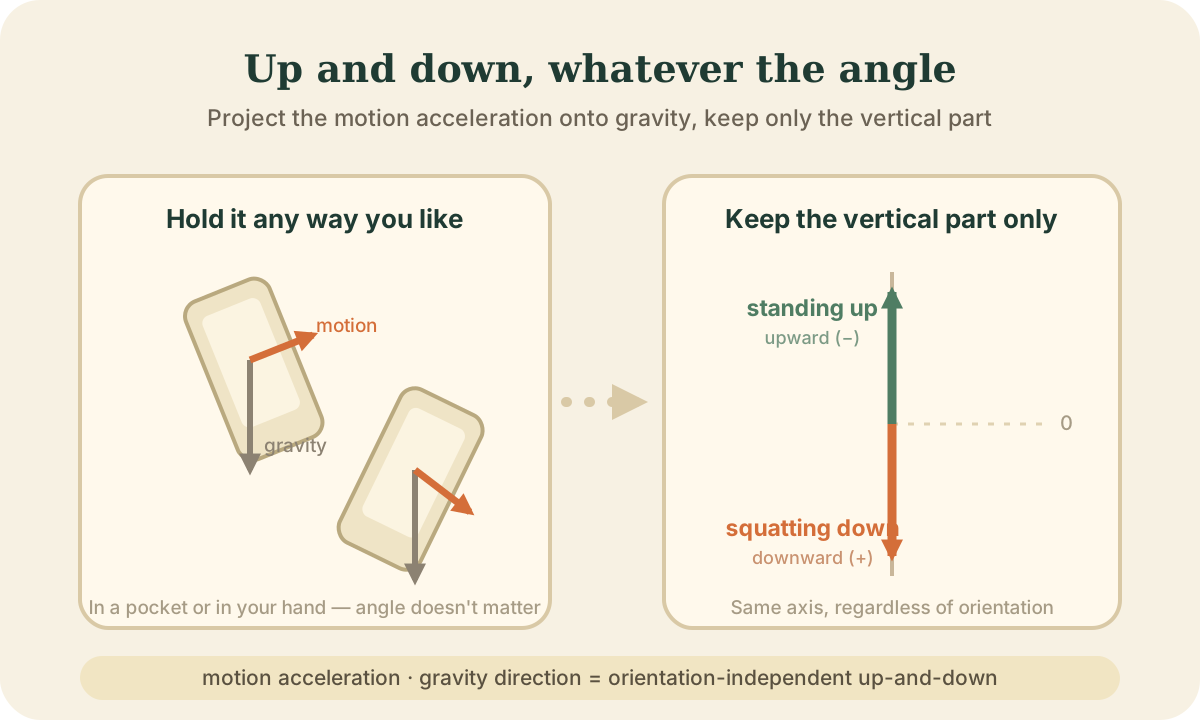
In LegScroll, a positive vertical value means “squatting down” and a negative one means “standing up.” Reading both pocket and hand on the same axis is what that projection buys you.
Telling a shake apart from a squat
Even once you can read vertical movement, a problem remains. Walking, bending over, shifting the phone in your grip — all of these move the vertical value too. You have to pull only the squats out of that, and count each as one.
LegScroll doesn’t use a fixed threshold. The size of a movement differs between people, and the noise differs between situations. Instead, it builds its baseline from your recent movement.
- From roughly the last 3 seconds of movement, it computes the mean and the amount of spread (the standard deviation).
- Around the mean, it draws a “noise band” whose width follows that spread.
- Small wobbles that stay inside the band are ignored from the start.
Only a movement that clearly leaves the band becomes a candidate, and it is counted as one rep only when it walks through this sequence:
idle → down → bottom → up → count
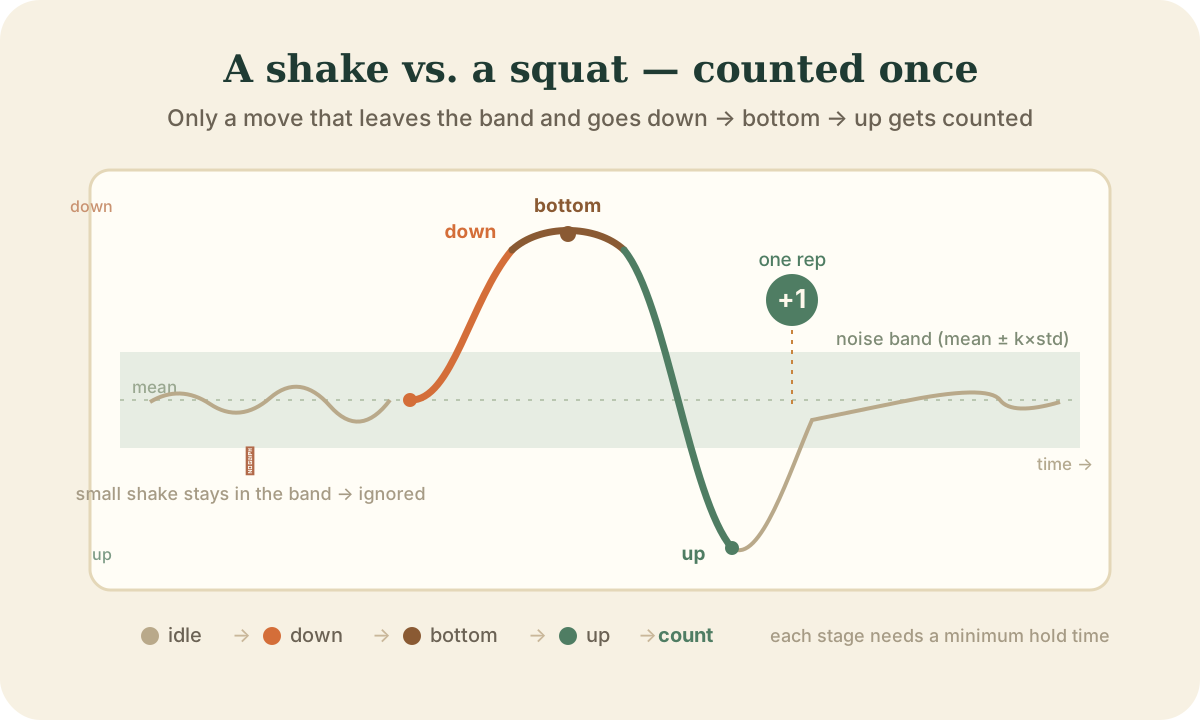
Each stage has a minimum time. A split-second jolt can’t satisfy “down,” and if the pattern breaks partway it falls back to idle. At the bottom, the app tracks the deepest point of the sink and checks that you actually came back up from it (that the motion reversed). That’s how half-squats and small shakes are kept from counting as a rep.
The width of the threshold can also be tuned with the sensitivity setting — tighter if it counts too much, looser if it misses reps.
The more you use it, the more it fits your pace
Everyone squats at a different speed. Some sink slowly and deep; others keep a brisk tempo.
From your first few squats, LegScroll gradually learns how long your down, bottom, and up phases take, and shifts the minimum times toward your pace.
The learning only ever loosens. It won’t quietly tighten the bar and start missing reps; it only makes an adjustment like, “your tempo is around this, so I’ll accept reps up to this speed as one.” What it learns is stored on the device and carries over the next time you open the app.
So a little way into using it, the counting sits closer to your own movement than it did on day one.
When it still gets it wrong
Honestly: automatic counting isn’t perfect.
If you make a large up-and-down movement that resembles a squat, it can be picked up as something close to one. And an extremely shallow or fast squat gets harder to separate from noise.
To reduce these errors, LegScroll has a few safeguards.
- When it feels a strong jolt — like pulling the phone out of a pocket — it pauses counting for that moment and rebuilds its baseline.
- It only updates the baseline while things are calm, so the violent values during a squat don’t contaminate the noise band.
- If it gets stuck in any stage for too long, it resets the state and returns to idle.
Even so, movement varies between people and environments vary too. That’s exactly why there’s a sensitivity setting to match yourself. Think of it not as “magic that never errs,” but as “a tool that tunes toward your movement and counts as accurately as it can.”
Try counting for real
Once you know the mechanism, watching the number climb may feel a little different.
LegScroll counts squats automatically using the accelerometer and detection algorithm described here. You don’t have to stop and jot down reps, so you can stay with the movement. The counted reps build up as your daily total and your streak.
If you’d rather start from “why does recording reps make squats stick at all,” If You Can’t Stick With Squats, You May Not Need More Motivation — You May Need Tracking is a good companion piece.
Summary
There are several decisions between a squat and the number going up by one.
- It watches acceleration, not video (50 times a second)
- It projects motion onto gravity to read up-and-down independent of orientation
- It builds a noise band from recent movement and counts only when a move leaves the band and goes down → bottom → up
- It learns your pace from the first few reps
- It deliberately ignores strong jolts and unstable values to protect its baseline
As an exercise, a squat is simple. But for a machine to correctly call it one rep, these quiet touches have to stack up.
If you’d rather start from how to begin and keep up squats themselves, the Squat Guide leads into the related articles.

LegScroll
Make Squats Easier to Count and Keep
LegScroll auto-counts squat reps and turns your training into visible records, streaks, heatmaps, and a province-conquest journey.